The podcast editorial calendar.
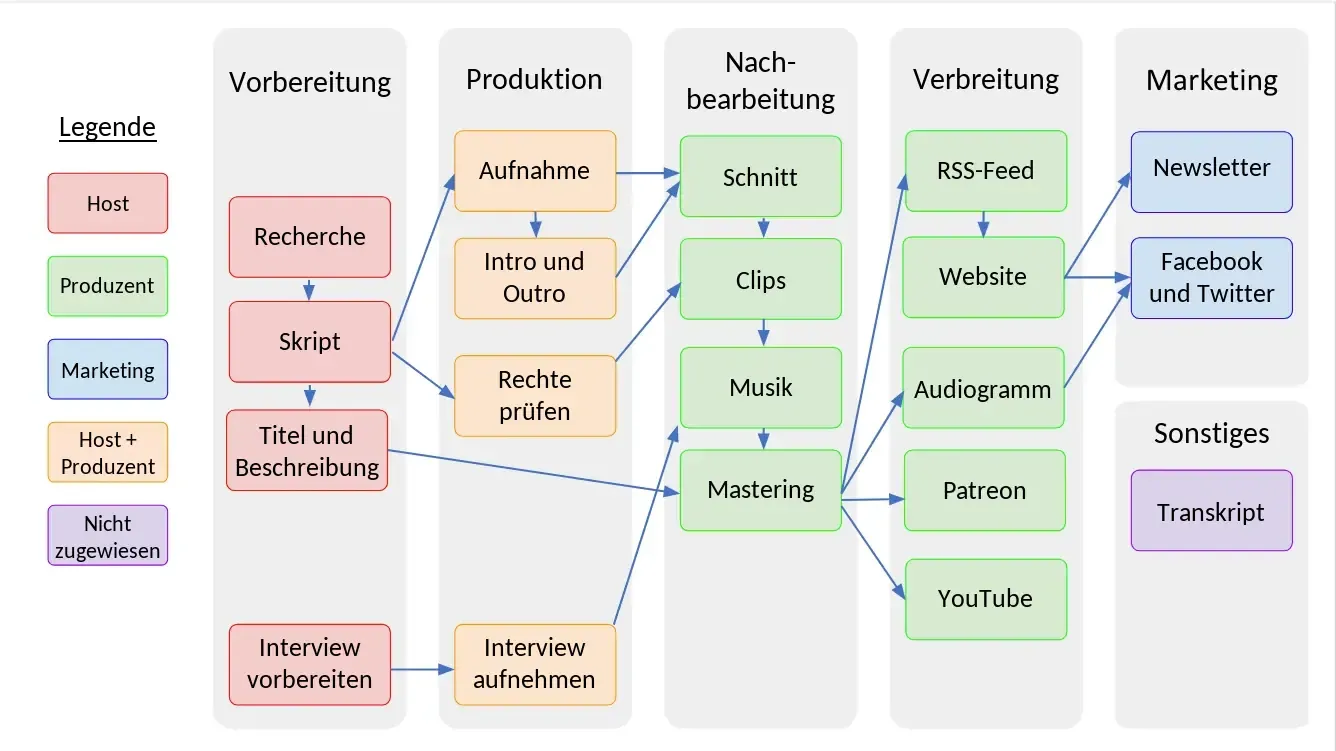
Template, tools and checklist for predictable episodes.
Imagine having to give a presentation in front of 100 people every Monday, without preparation and without a plan. Sounds like a nightmare, right? That is roughly how many people produce their podcast. On Sunday evening they remember that an episode is due tomorrow, and then the search for a topic begins.
An editorial calendar ends that. It is the production system behind your podcast, just like at Netflix. They do not spontaneously shoot a new episode every morning either, they have a plan. And you need one too.
Here I show you how to set up your podcast editorial calendar in 30 minutes, which tool is enough for it and how to use it to cut your time per episode considerably.
What is a podcast editorial calendar?
A podcast editorial calendar is an overview of all planned episodes with topic, guest, recording date, release date and status. It includes a checklist with all the tasks that come up for each episode. That way you see at a glance what is next, who is working on what and where things are stuck.
What does an editorial calendar do for you?
You make fewer mistakes. A forgotten outro, bad audio or a wrong title in the feed no longer happen with a checklist.
You can hand off tasks. Editing, show notes and upload do not all have to come from you, but only if everyone knows what needs to be done by when.
And you keep going. Many podcasts fall asleep after a few episodes, the scene calls it podfading. There are usually enough ideas, what is missing is a system. With a plan, 8 episodes turn into 80.
How to build your editorial calendar in 30 minutes
Step 1, write everything down (10 minutes)
Write down everything you do for a single episode. Really everything, even small things like checking the mic or creating a backup. For most people it comes out roughly like this:
- Find and research a topic
- Invite and brief a guest
- Record
- Edit
- Write show notes
- Upload and publish
- Social media and newsletter
Step 2, break tasks down (10 minutes)
Behind “invite a guest”, for example, there are six tasks: find the guest, research contact details, write the email, find a date, tech check and briefing. Do that for every big chunk. Only then do you see what really comes up, and these small steps are what you can later hand off or automate individually.
Step 3, choose the tool (10 minutes)
Start simple. On your own, Google Sheets or Excel are completely sufficient; with a team or an editor, Trello or Notion are better because everyone sees the same status. You will find the comparison with prices further down.
Which columns belong in a podcast editorial calendar?
A podcast editorial calendar needs seven columns: episode number, topic, guest, recording date, release date, status and who is responsible. For the status, four stages are enough: idea, recording, editing and live. You do not need more at the start.
This is what it can look like as a template:
| Episode | Topic | Guest | Status | Recording | Release | Responsible |
|---|---|---|---|---|---|---|
| #024 | Best of the first season | Solo | Live | 02.01. | 25.01. | Me |
| #025 | SEO basics for podcasts | Max M. | Editing | 15.01. | 01.02. | Editor |
| #026 | Content strategy | Solo | Recording | 22.01. | 08.02. | Me |
| #027 | Questions from the community | Solo | Idea | 29.01. | 15.02. | Me |
The table shows sample data, and the columns work in any tool, from Google Sheets to Notion.
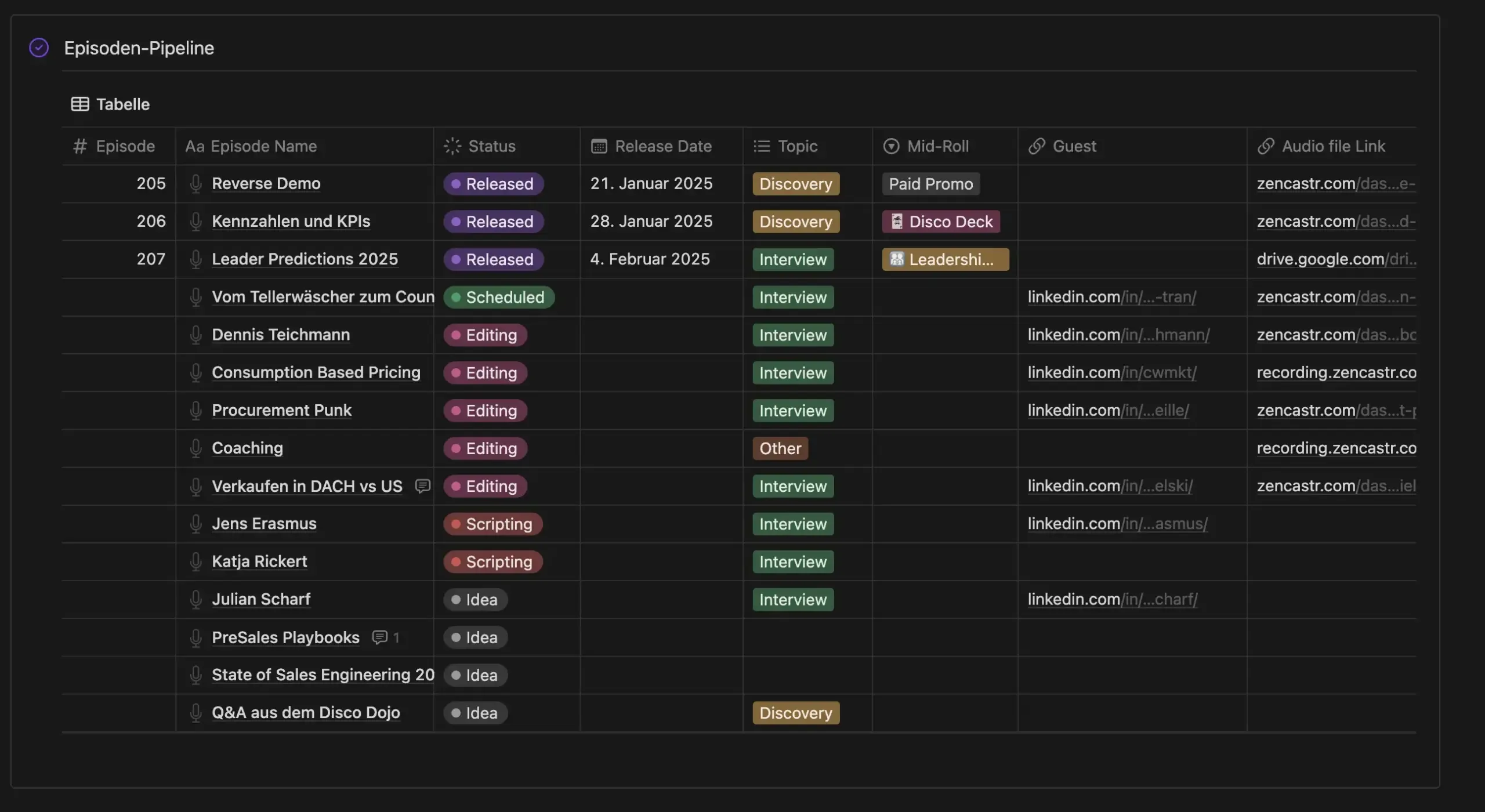
This is what my editorial calendar looks like in Notion
I plan with Notion myself. Each episode is a row whose status moves from idea through script, recording and editing to release. As a calendar I see the same entries again and immediately know which week is empty.

Which tool fits your editorial calendar?
For most podcasters, Google Sheets is enough at the start. All tools in the table have a free tier that easily covers an editorial calendar.
| Tool | Best for | Free | Paid from approx. |
|---|---|---|---|
| Google Sheets | Starting on your own, fast and familiar | Yes | stays free |
| Notion | Plan, checklists, guests and notes in one place | Yes | 10 $ |
| Trello | Episodes as cards on a board, very simple | Yes, up to 10 people | 5 $ |
| Airtable | Spreadsheet with database features and many views | Yes | 20 $ |
| ClickUp | If you plan more than just the podcast | Yes | 8 $ |
| Asana | Teams with several projects and clear responsibilities | Yes, up to 2 people | 11 $ |
| Monday | Larger teams with lots of automation | Yes, up to 2 people | $9, from 3 people |
Prices are approximate values in US dollars per person per month with annual billing, according to the providers’ pricing pages, approximate and subject to change. In euros and with taxes they differ slightly, and they change constantly. Check with the provider before signing up.
I recommend starting on your own with Google Sheets. As soon as someone works on your podcast with you, switch to Notion, because plan, checklists, guest list and scripts live in one place there. That is how I work myself. Asana and Monday are strong, but usually overkill for a single podcast.
How does the editorial calendar save you time?
You save the most time with three levers. You record several episodes in one go, let boring tasks run automatically and hand off the editing. The editorial calendar is the foundation for all three.
Batching, meaning several episodes in one day
Instead of recording one episode every week, you record four in one go once a month. You build the setup only once and get into a flow. For me it looks like this: in the first week I record four episodes on one day, after that the editing runs externally, and I am free for other projects. If four is too many for you, test it with two in a row first.
Automation for the boring tasks
With tools like Zapier, Make or n8n, recurring tasks run on their own. Once the episode is online, the social media post is created, the guest gets an email, and a newsletter draft is ready. Even if that saves you only 30 minutes per episode, with 52 episodes a year that is already 26 hours. Which workflows are worth it and what Claude, ChatGPT or n8n take over is covered in the article Automating your podcast with AI.
Hand off what only costs you time
Editing, transcript, show notes and cover design can be done by someone else for you. These tasks are not much fun and eat a lot of time that is better spent on your conversations and your community. If you hand off just one thing, make it the editing, because it is the biggest time sink.
How do you never run out of topics for your podcast?
With a topic pool, seasonal planning and one episode in reserve. These three building blocks belong in every editorial calendar.
The topic pool
Create a list of 50 ideas and write in everything you come across: questions from your listeners, news from your industry, timeless basics, dream guests and ideas for solo episodes. When you plan an episode, you simply reach into the pool. Which topics resonate most with your listeners is shown by your podcast statistics.
Seasonal planning
Enter important dates now: holidays, industry events, milestones like episode 50 or 100, and your breaks. The summer break in particular is something you should plan rather than let it just happen. It gets even easier if you plan in seasons right away.
The emergency episode
Record a timeless episode in reserve, for illness, technical problems or when a guest cancels at short notice. Timeless topics work well, such as “The 10 most common mistakes in …” or a best-of of your previous episodes.
Why every episode should also appear as text
Google understands text much better than audio. So give every episode its own page on your website, with a transcript or summary, a title containing the term your listeners search for, and two or three internal links. Plan this step in the editorial calendar as a separate task. In the long run it brings you more new listeners than any advertising.
Checklist and weekly plan for one episode
The checklist makes sure the same steps are in place for every recording. At minimum, these points belong in it:
- Before recording, check the level with a short test recording
- Phone off, window closed, backup recording started
- Right after recording, save the raw file
- Commission the edit and draft the show notes
- Inform the guest about the release date
Spread over a week, the work on one episode looks roughly like this:
| Day | Task | Your time |
|---|---|---|
| Monday | Set and research the topic | approx. 30 min |
| Tuesday | Record | approx. 45 min |
| Wednesday | Editing, external | 0 min |
| Thursday | Write show notes and upload | approx. 30 min |
| Friday | Publish and promote | approx. 15 min |
Total approx. 2 hours of your own working time per episode when the editing runs externally.
Two hours per episode is already good, but it can get better. At Studio M my clients invest no more than 1 hour of production time per week, because my team and I take over editing, music, video and publishing completely.
Common mistakes with the podcast editorial calendar
The most common mistake is starting too complicated. Start with a simple spreadsheet, you can always upgrade.
Just as dangerous is a plan with no breathing room. Plan about 80 percent firmly and leave 20 percent free for spontaneous topics. If you need twelve episodes for a quarter, fix ten and keep two slots as a buffer. Something always comes up.
And do not put the tool above the content. The prettiest Notion board does not help you if nobody is interested in the episodes. How to find topics that fit your listeners is covered in the article on the podcast concept.
What an editorial calendar really achieves
A good example are Tim and Jan from PreSales Unleashed, with whom I worked at Studio M. The two used to need about four hours for a single episode. Today they produce the content for a whole month in about four hours.
Downloads have tripled since then. Not because the content suddenly got better, but because they deliver consistently.
But let me be honest: it took about six weeks until the system ran smoothly, and the first of those were bumpy. That is normal.
Bonus
My Notion template for your editorial calendar
The screenshots above are not an example from the internet. That is my own editorial calendar with episode pipeline, calendar, guest list, briefings and prompts, all in one Notion workspace.
You can get exactly this template from me. Send me a short “Notion template” via the contact form , and I will send it to your email address. You copy it into your own Notion and enter your first episode right away, without having to build anything yourself.
Conclusion on the podcast editorial calendar
A podcast editorial calendar turns your hobby podcast into a professional project. You do not have to be perfect for that, you just have to start. Write down today everything that comes up for an episode, set up the spreadsheet with the next four episodes tomorrow, and record two episodes in one go this week. In three months you will wonder how you ever managed without a plan.
And if you implement just one single thing from this article, make it this one. Hand off the editing. That changes more than any tool.
Frequently asked questions about the podcast editorial calendar
For most podcasts, four to eight weeks in advance is enough. That lets you record in batches and invite guests in time, while staying flexible for current topics. Holidays, milestones and breaks you additionally enter for the whole year.
Yes, you can copy the columns from the table above directly into Google Sheets or Excel. My own Notion template is available on request, how to get it is explained in the bonus further down.
That depends on how much you batch, automate and hand off. With a good plan and external editing, you are at about two hours of your own work per episode.