The right podcast microphone.
Which microphones we recommend after more than 6,300 episodes, without tech jargon.
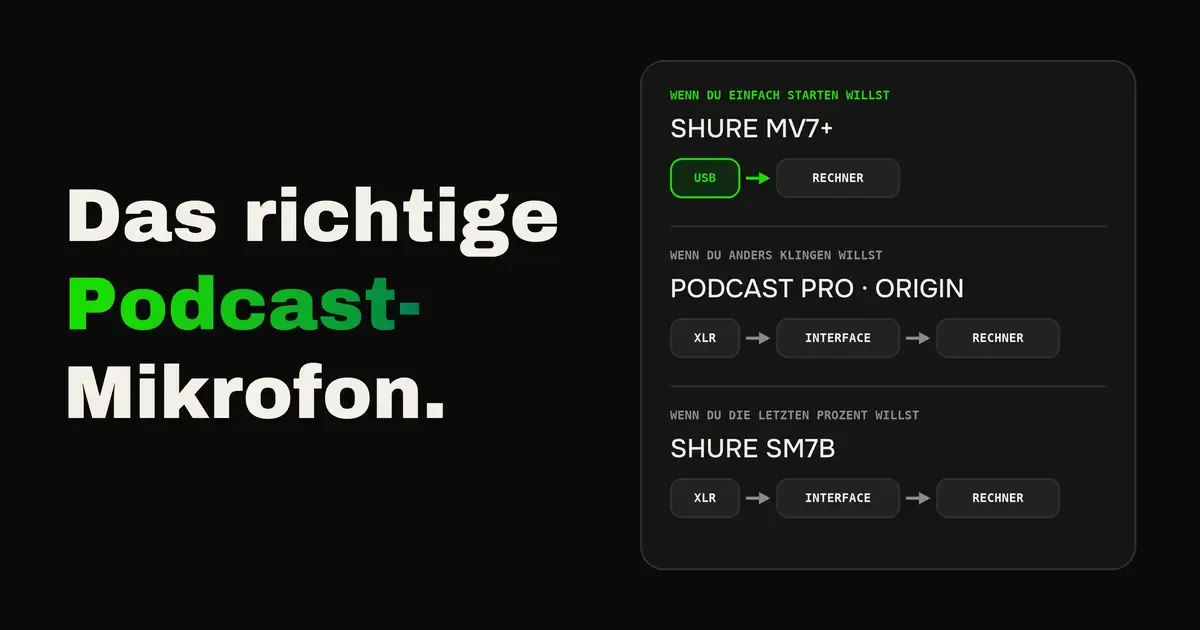
For most podcasters, the Shure MV7+ is the right microphone. You plug it into your computer via USB and can record right away. If you want to sound different from the standard you know from many podcasts, take the Sontronics Podcast Pro or the Aston Origin. And if you want to squeeze out the last few percent, go for the MV7+’s big brother, the Shure SM7B.
These are the microphones my team and I recommend after more than 6,300 produced episodes. In this article you learn which of them fits your room, what you need for two or more people, and why you should not trust most best-of lists on the web.
Why your room matters more than your microphone
Before you buy a microphone, look at the room you record in. It decides more about the sound than the price of the microphone.
- Dynamic microphones mostly hear you: They pick up what happens directly in front of them and largely ignore the rest. Reverb, fridge and street barely make it onto the recording. The Shure MV7+ and the Sontronics Podcast Pro are among them.
- Condenser microphones hear the whole room: They sound more open and refined, but they also pick up every bare wall and every noise in the room. The Aston Origin is such a microphone.
The rule of thumb is simple. If you record in a normal office or living room, take a dynamic microphone. If you have a quiet room with carpet, curtains and full shelves, a condenser microphone plays to its strengths. An expensive condenser microphone in an empty office sounds worse than a cheap dynamic microphone in the same room.
USB or XLR
- USB: That is plug and play, you connect the microphone to your computer and you are done.
- XLR: You additionally need a small device between microphone and computer, a so-called audio interface. That costs a bit more, but the quality is a notch better again. It is worth it for anyone who really wants to get the last few percent.
By the way, the Shure MV7+ has both connections. You start via USB and can add an interface later without needing a new microphone.
The microphones we recommend
| Microphone | Type | Connection | For whom | Price approx. |
|---|---|---|---|---|
| Shure MV7+ | dynamic | USB-C and XLR | Everyone who just wants to get started, in any room | €295 |
| Sontronics Podcast Pro | dynamic | XLR | A warm sound of your own in normal rooms, also for several speakers | €155 |
| Aston Origin | condenser | XLR | An open sound of your own in quiet rooms | €222 |
| Shure SM7B | dynamic | XLR | Everyone who wants to get the last few percent | €390 to €460 |
Approximate prices from the retailer Thomann approximate, Shure SM7B approximate. They change constantly, check with a retailer before buying.
What sets the four apart
- Shure MV7+: It is the easiest route to good sound. Software automatically levels your volume and filters background noise, and you mute yourself with a tap on the microphone itself. Because it also has an XLR connection, it grows with you when you want more later.
- Sontronics Podcast Pro: It is made for everyone who does not want to sound like the standard you know from countless podcasts. It is built for speech and has a built-in pop filter. It listens very precisely to the front and strongly blocks out the room. That makes it ideal when two or more people sit at the same table, because everyone mainly records their own voice. Hang it on a boom arm instead of a desk stand, otherwise you hear every knock on the table.
- Aston Origin: It sounds completely different from the dynamic microphones, more open and detailed. For that you need a quiet room. It has a built-in pop filter and needs power from the audio interface, which all common devices provide.
- Shure SM7B: It is the big brother of the MV7+ and has been a classic in radio and podcasting for decades. Whoever wants the last few percent takes the SM7B instead of the MV7+. It is considerably more expensive and needs an interface with plenty of gain, such as the Focusrite Scarlett 2i2. There is no pure USB version, but Shure offers it in a bundle with a small USB adapter.
What else you need for XLR
An XLR microphone needs a device that connects it to your computer. Which one depends on how many people speak at the same time. You do not need an expensive studio device for this, the simple models deliver exactly what a podcast needs.
| Device | Microphones | Special | Price approx. |
|---|---|---|---|
| Focusrite Scarlett Solo (4th gen) | 1 | Small, reliable, the entry point for one person | €100 to €130 |
| Focusrite Scarlett 2i2 (4th gen) | 2 | For two people, with enough gain even for the Shure SM7B | €190 to €200 |
| Rode RØDECaster Duo | 2 | Touchscreen, jingles and effects at the push of a button | €360 to €450 |
Approximate prices, approximate and subject to change.
The right set for your situation
| Your situation | Our recommendation | Total approx. |
|---|---|---|
| Alone at your desk | Shure MV7+ via USB, plus a boom arm | €325 |
| Alone, with a sound of your own | Sontronics Podcast Pro or Aston Origin with Focusrite Scarlett Solo | €255 to €350 |
| Alone, the last few percent | Shure SM7B with Focusrite Scarlett 2i2 | €580 to €660 |
| Two people at a table | Two Sontronics Podcast Pro with Focusrite Scarlett 2i2 | €500 to €510 |
| Video, without a microphone in the shot | A wireless lavalier microphone like the DJI Mic 3 | €220 to €260 |
| Remote guests | See the bonus at the end |
Approximate prices, approximate and subject to change, without headphones and cables. Boom arm about €30.
More about camera, light and the complete home studio is in the article Video podcast equipment for your home studio.
Why you should not trust best-of lists
On a large German comparison site, the test winner for podcast microphones is a gaming microphone with colorful RGB lighting for about €27. Such lists usually earn from every click to the shop, and you rarely find out whether anyone there tested the microphone with a voice in conversation.
- Look for speech: A microphone that sounds good for music or gaming does not have to sound good for a voice in conversation.
- Listen to real recordings: Ideally from a tester who records every microphone with the same voice in the same room. Then you really hear the microphone and not the room.
- Ask about the room: A test in a soundproofed studio says little about how the microphone sounds in your living room.
Audio samples for our recommendations
The US tester Podcastage records every microphone with the same voice and the same tests, for example with background noise and in a room without treatment. You can clearly hear the difference.
How to get the best out of your microphone
- Get close: A hand’s width of distance is a good guideline. The closer you are, the less you hear of the room.
- Speak slightly off-axis: Speak just past the microphone instead of straight into it. That way it does not pop on “P” and “B”.
- Boom arm instead of desk stand: The microphone always stays in the right spot, and bumps against the table do not end up on the recording.
- Test the level beforehand: Speak as loudly as in your loudest moment, like when laughing. The meter must never go into the red.
- Headphones on: Whoever hears themselves immediately notices when they drift away from the microphone.
How to also sound confident with the microphone is in the article Speaking better on your podcast.
Which microphone to recommend to your guests
In remote recordings, your guest’s microphone is often the weakest link. No listener knows that your guest sat in their home office with AirPods. They only hear that the episode sounds worse.
- No AirPods, no headsets, no wired earbuds: The microphone in them is built for phone calls, not for a podcast.
- For guests who come once: A dynamic USB microphone like the Samson Q2U from about €110 is completely sufficient.
- For guests who come more often: The Shure MV7+ is worth it for anyone who is regularly a guest on podcasts.
How to prepare the whole recording with remote guests is in the article Recording a podcast remotely.
Bonus
The text for your guests
Copy this text into the email to your guest, ideally a week before the recording. That leaves enough time to get a microphone.
Copy
Hi [Name], I am looking forward to our conversation on [date] at [time]. So you sound as good in the episode as you deserve, a quick request about the setup: 1. Please use a proper microphone, no AirPods, no headset and not the microphone in your headphone cable. Those are built for phone calls and sound thin in a podcast. 2. If you do not have one: the Samson Q2U (from about €110) simply plugs into your computer via USB and is completely sufficient. If you are often a guest on podcasts, the Shure MV7+ (about €295) is worth it. 3. Wear wired headphones so there is no echo. 4. Find a quiet room, ideally with carpet, curtains or full shelves. Kitchens and bare offices echo a lot. 5. Keep the microphone about a hand’s width from your mouth and speak slightly past it. If you are unsure, just send me a photo of your setup and I will take a look. See you soon [Your name]
Adjust the prices shortly before sending, they change constantly.
Conclusion on the podcast microphone
For most people the Shure MV7+ is the right choice, because it simply works and grows with you. If you want to sound different, take the Sontronics Podcast Pro for normal rooms or the Aston Origin for quiet rooms, and if you want the last few percent, the Shure SM7B. And whichever microphone you buy, your room and the distance to the microphone make more of a difference in the end than the price.
Frequently asked questions
For most podcasters the Shure MV7+, a dynamic microphone with USB and XLR connections for about €295. If you want a sound of your own, take the Sontronics Podcast Pro or the Aston Origin, and if you want the last few percent, the Shure SM7B with an audio interface.
USB is plug and play, you connect the microphone directly to your computer. XLR additionally needs an audio interface, so it costs a bit more, but delivers a notch better quality. For starting out, USB is completely sufficient.
Two dynamic microphones like the Sontronics Podcast Pro and an audio interface with two inputs, for example the Focusrite Scarlett 2i2. Together that costs about €500. Dynamic microphones mainly pick up your own voice, so the speakers at the table barely interfere with each other.
That depends on your room. In a normal office or living room, a dynamic microphone is the better choice because it largely blocks out the room. In a quiet room with carpet and curtains, a condenser microphone sounds more open and refined.
No, the microphones in AirPods, headsets and wired earbuds are built for phone calls and sound thin in a podcast. Even a simple dynamic USB microphone from about €110 sounds considerably better.