Podcast reach on YouTube.
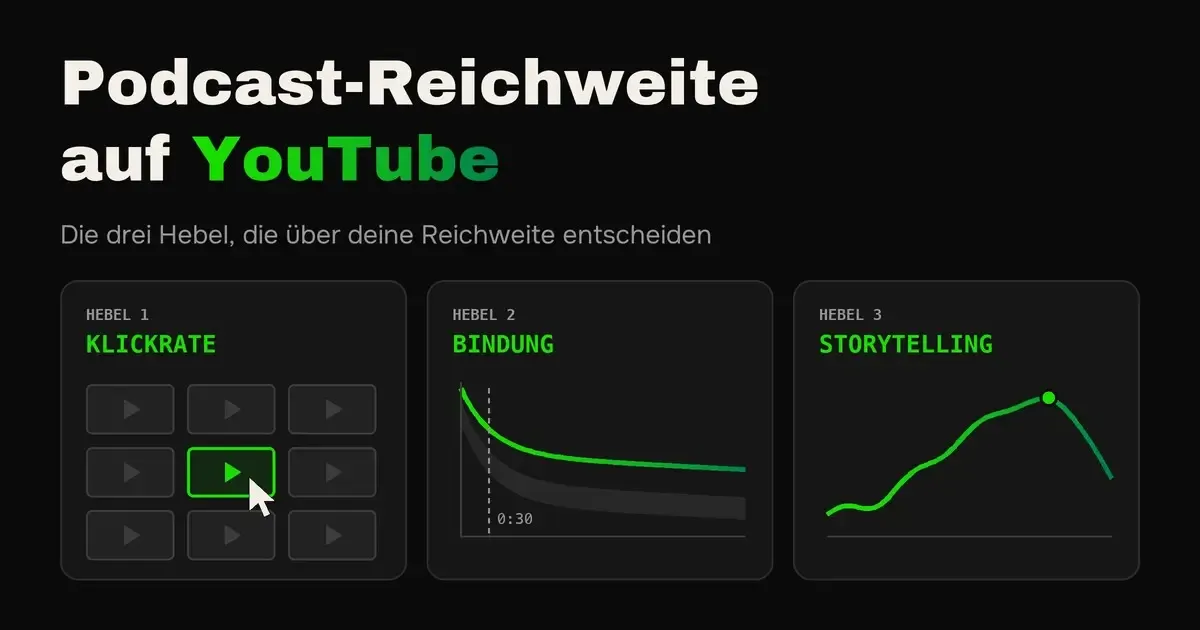
The three levers that decide your reach, and how to use them.
You upload a new episode to YouTube every week, and the views bob along at a few dozen. Yet over a billion people worldwide watch and listen to podcasts there every month. So the reach is there. It just does not arrive at your channel.
The short answer is this. Whether YouTube recommends your podcast hangs on three levers. The click-through rate shows how many people click on your video. Audience retention, also called retention rate, shows how long they stay afterwards. And your storytelling decides whether they stay until the end. Here you learn how to measure all three and what YouTube pros specifically do to improve them.
How YouTube decides who it shows your podcast to
YouTube wants to suggest to every user the videos they like to click, watch for a long time and rate well afterwards. For that, according to its own statements, YouTube evaluates clicks, watch time, likes, dislikes, shared videos and surveys in which viewers rate videos with one to five stars.
A click alone counts for little. Only watch time in videos that viewers rate four or five stars afterwards counts as truly valuable. So you have to get the click, deliver what you promise, and hold attention until the end. That is exactly what the three levers stand for.
Lever 1, the click-through rate
The click-through rate shows what percentage of the people YouTube shows your video to click on it. If it is shown 1,000 times and 50 people click, it is 5 percent. You find it in YouTube Studio under Analytics as “Impressions click-through rate”.
According to YouTube, half of all channels and videos sit between 2 and 10 percent. How high yours turns out depends heavily on where your video is shown. On the home page, many people see it who were not looking for you at all, which is why the click-through rate is lower there than in search. So do not compare yourself with other people’s benchmarks but with your own videos. If an episode is well above your average, look at what was different about thumbnail and title.
How to build a thumbnail that gets clicked
The viewer sees the thumbnail before anything else, and on a phone it is often hardly bigger than a postage stamp. So the question is not whether it is pretty, but whether it is understood in half a second in the feed. This is what YouTube pros pay attention to.
- One eye-catcher, not five: A thumbnail has one main subject and at most three elements, for example a face, a short line and an object. Anything beyond that blurs into mush when small.
- The face large and with emotion: For interview podcasts, the guest’s face usually works, cropped close, with an expression that fits the statement, such as skepticism, surprise or determination. A neutral smile like on a job application photo tells nothing.
- The strongest statement as text: Instead of the topic, the episode’s most pointed claim belongs on the image, in three to five words, for example “Cold outreach is dead”. Ideally a sentence you would not expect.
- Thumbnail and title tell the story together: They do not repeat each other, they complement each other. The image creates the curiosity, the title delivers the context. If the image says “Cold outreach is dead”, the title can say what works instead.
- Contrast to the feed: Set your subject clearly apart from the background, for example with a darkened or blurred background and a strong accent color. Look at which colors dominate in your niche, and set yourself apart from them.
- Keep the bottom right corner free: That is where YouTube overlays the video’s length and covers everything underneath.
- The postage stamp test: Shrink your thumbnail to about 170 pixels wide before uploading. If you can no longer recognize text and face immediately, it is too complicated.
- Recognizable, but not identical: A fixed frame of colors, font and layout makes your episodes recognizable. But image and text change every time, otherwise regular viewers do not see that there is something new.
- Learn from outliers: Search your niche for videos that have far more views than the rest of their channel. Tools like vidIQ or TubeBuddy show you that directly. What their thumbnails have in common is usually the best indication of what your audience clicks.
Technically, YouTube recommends 1280 × 720 pixels in 16:9 format and at most 2 MB. And do not forget your old episodes. A new thumbnail for a good but poorly clicked episode can give it a second chance.
A title that sparks curiosity
“Episode 47 with John Doe” gets no clicks from anyone who does not know John. Your guest’s name only belongs up front if your audience knows it. Otherwise put the topic or the concrete result at the start, in the words your audience searches with. You do not need the episode number in the title.
Also keep in mind where the episode is found. Someone searching needs a clear term like “cold outreach for coaches”. Someone scrolling the home page needs a reason for curiosity. The best titles combine both and stay under 60 characters if possible, with the most important part at the start, because YouTube cuts off different amounts depending on the view. How to develop and evaluate titles with AI I show you in the article with ready-made AI prompts for podcasters.
Let YouTube test
In YouTube Studio you can upload up to three thumbnails for one video with “Test & compare”, and since 2025 titles as well, provided the feature is enabled on your channel. YouTube serves the variants and picks a winner after a few days to two weeks. The interesting part is how. Not by the highest click-through rate, but by watch time per impression. So a sensational thumbnail that brings many clicks but quickly drives viewers away loses. And that brings us to the second lever.
Lever 2, audience retention (retention rate)
Audience retention shows how long people watch your video after clicking. In YouTube Studio you see the average view duration and a curve that shows for every minute how many are still there. A 60-minute podcast that is watched for 24 minutes on average has an average audience retention of 40 percent.
The most important moment is the beginning. Under “Key moments for audience retention”, YouTube shows how many are still there after 30 seconds. If it is at least 50 percent, your intro counts as above average. If many drop off early, according to YouTube the beginning usually does not match what thumbnail and title promised.
There is no fixed percentage for the whole episode, because short videos almost always hold proportionally better than long conversations. YouTube therefore compares every video with the typical retention of your last ten videos of similar length, the gray area in the chart. If your curve is above it, the episode held better than usual. How to read retention in Spotify and Apple Podcasts I explain in the article Understanding podcast statistics.
How to keep viewers longer
- The first minute is the most important: The internal production guide from MrBeast’s team, which became public in 2024, says most people drop off in the first minute. That is why it has to show that the video delivers what the thumbnail promises. Long jingles, rounds of greetings and “before we start, subscribe to the channel” have no place there.
- Start with the strongest moment: Many big video podcasts start with a short montage of the episode’s best statements, and only then comes the greeting. The viewer immediately knows what to expect and wants to know how these sentences came about.
- Re-hook regularly: The same guide deliberately places particularly strong moments at fixed intervals to win back viewers whose attention is just fading. In a podcast that can be a new question, a surprising number or a short story.
- Set chapters: With timestamps in the description, viewers jump to the right part instead of closing the video. The first marker has to start at 00:00, and you need at least three chapters of at least ten seconds each. Phrase the names like small headlines that spark curiosity. ChatGPT or Claude provide suggestions from the transcript.
- Variety in the picture: A single static shot for an hour tires people out. Switch between wide shot and close-up, show the guest when they speak or react, and bring in graphics or screenshots when it is about numbers and examples. Even two camera angles make a big difference.
- Audio that does not annoy: Viewers forgive a mediocre picture more readily than bad audio. With echo, noise or volume jumps, many click away quickly. A decent microphone and automatic post-processing, for example with Auphonic, solve that.
- Lead on after the episode: Point to the next fitting episode in the end screen and in playlists so viewers keep watching with you instead of the next channel.
Lever 3, your storytelling
Click-through rate and audience retention you can read off. The third lever appears in no statistic, and yet it drives the other two. It means how you structure and tell your content. A topic can be bone dry: taxes, sales, data protection. If it is well structured and told vividly, viewers still hang on your every word for 30 or 45 minutes. How to tell stories that stick is in the article Speaking better on your podcast.
Whether your storytelling works you can see in the shape of the retention curve. YouTube marks spikes, meaning passages that are watched several times or shared, and dips where viewers skip ahead or stop. At the dips you usually find a long list, a digression or a part without an example.
How to tell it so people stay
Rhetoric coaches and successful YouTubers agree on the basics.
- Open curiosity gaps: Curiosity arises when we notice that a piece of knowledge is missing and the answer seems within reach. The behavioral economist George Loewenstein described this as the information gap. Ask a question at the start that you only answer later, or announce what is still to come, for example “In a moment I will show you the mistake almost everyone makes”. But answer every question you open.
- Stories with an arc: Almost every topic contains a story: a project with ups and downs, a client with a problem, a mistake and what came of it. Tell the starting situation, conflict, turning point and solution first, then the rule behind it. Abstract lists hardly stick.
- One thought at a time: Do not assume prior knowledge, rather pack less into an episode and summarize in between where you are. Whoever loses the thread is gone, and on YouTube the next suggestion is only a thumb away.
- Contrasts and clear opinions: Tension arises where something is at stake. Set the common opinion against your own, and disagree with your guest now and then. A conversation in which everyone only agrees just trickles along.
- Voice, pace and pauses: How you say something counts as much as what you say. Vary the pace, stress the decisive words and pause before important statements. Look into the camera when you address viewers directly.
Learning to speak on camera
Some are naturals, everyone else can learn it. Rhetoric or speech training for appearing on camera often brings more than any new piece of gear; such trainings exist in almost every larger city and online. Your best training material is your own episodes: watch them with the retention curve next to them and work on the dips. The basics are in the article Speaking better on your podcast.
Why the three only work together
With an exaggerated thumbnail you push the click-through rate up, but if the video does not deliver what it promises, viewers drop off and YouTube shows it to fewer people. A strong opening holds them for the first minutes, but without good storytelling the curve still sinks afterwards. And the best story is useless if nobody clicks on it. Only when all three are right do views, subscribers and watch time follow by themselves.
Clips, Shorts and the right setup
For new viewers, short clips are an easier entry than a whole episode. Publish the strongest moments as Shorts. Since October 2024 they may be up to three minutes long, and podcast clips in particular benefit from that because a thought gets time to be finished. When uploading each Short, specify the whole episode as the related video, then it appears as a link in the Short.
Also create your podcast in YouTube Studio as a podcast, or mark an existing playlist as a podcast. Then your episodes appear in the podcast section and in YouTube Music. You can also submit pure audio via RSS feed, which is available in Germany, but usually holds viewers worse than real video. How that works step by step and how your channel stays tidy is covered in the article Uploading your podcast to YouTube.
Tools that help you
| Tool | What for |
|---|---|
| Canva, Photoshop or Adobe Express | Thumbnails with a fixed template in your colors |
| ChatGPT and Claude | Titles, descriptions and chapter markers from the transcript |
| OpusClip or Descript | Clips and Shorts from long episodes |
| TubeBuddy or vidIQ | Find search terms and analyze successful videos on your topic |
| Auphonic | Automatic audio processing, even volume, less noise |
All tools have free versions or trial periods; for more features you need a subscription. As of October 2026.
Bonus
The camera trick for more clicks and longer retention
Scroll through YouTube Shorts and only look at the podcast clips. Most look the same: phone on a tripod, ring light, static picture. That is exactly why people swipe on. If your clip looks different from the ten before it, the thumb stops, and that is nothing other than a higher click-through rate.
A small gimbal camera with face tracking, such as the DJI Osmo Pocket, makes exactly this difference. It turns slightly with you when you move and thereby brings a calm, natural movement into the picture without you having to do anything in the edit. Add a larger sensor than in a phone and a look that people recognize. The picture feels more alive, and lively pictures hold viewers longer.
For interview podcasts I have thought one step further. The idea is a mini camera, hardly bigger than a thumb, that hangs on your own T-shirt by magnet. It films your guest from the front, and because they look at you while talking, they look almost directly into the lens. That creates real eye contact, without a tripod between you. Practically nobody uses this in podcasting yet.
Which cameras and microphones I recommend for this, what they cost and how to set them up I show you in the article Mobile video podcast setup in studio quality.
Conclusion on podcast reach on YouTube
More reach on YouTube does not hang on hundreds of little things but on three levers. You improve the click-through rate with a thumbnail that works at postage stamp size and a title that sparks curiosity, audience retention with a first minute that delivers on the promise. And your storytelling keeps people until the end. Compare yourself with your own videos, and your channel grows a little with every episode.
Frequently asked questions about podcast reach on YouTube
Work on three levers. A clear thumbnail and a title that sparks curiosity bring more clicks. An opening that immediately delivers on the promise, plus chapters, improve audience retention. And good storytelling keeps viewers until the end. Short clips as Shorts additionally bring new viewers to your full episodes.
According to YouTube, half of all channels and videos sit between 2 and 10 percent. How high yours turns out depends on where your video is shown. On the home page it is lower than in search. So best compare it with your own videos.
A large face with a clear emotion, usually the guest’s, plus at most three to five words with the episode’s strongest statement and strong contrast. Keep the bottom right corner free because the video length is overlaid there, and check whether the image is still legible at postage stamp size.
The retention rate, or audience retention, shows how long viewers watch your video on average. If at least 50 percent are still there after 30 seconds, your opening counts as above average according to YouTube.
Work on your storytelling. Ask a question at the start that you only answer later, tell concrete stories instead of bullet points and explain one thought at a time. Whoever is not a naturally captivating storyteller can learn it with speech training for the camera.