AI prompts for podcasters.
Ready-made prompts for ChatGPT and Claude, for every step of your episode.
You sit in front of the empty document after the recording. Write show notes, find a title, posts for LinkedIn and Instagram, and actually you also wanted to prepare the next episode today. This is exactly where AI takes a lot of work off your hands, if you give it the right instructions.
The short answer is this. AI tools like ChatGPT or Claude help you with everything around your episode, from the topic idea and interview questions to show notes, titles and social media posts. What they cannot do is replace your stance, your experience and your voice. Those still come from only one person: you.
In this article you get ready-made prompts for every step of your episode, to copy and adapt. I also show you how a good prompt is built and which tools we use at Studio M.
Which AI tools are suitable for podcasters?
For texts around your podcast, two or three tools are enough. Each has its strengths, and which fits best depends on the use case.
| Tool | Strong at | Good for in podcasting |
|---|---|---|
| ChatGPT | Versatile, text, images, web search | Topics, titles, social media posts, graphics |
| Claude | Long texts, natural writing style | Show notes and summaries from long transcripts |
| Gemini | Connected to Google Docs and Gmail | If you work in Google Workspace anyway |
| Perplexity | Research with source citations | Fact-checking, researching guests and topics |
| OpusClip | Short clips from long videos | Clips for Instagram, TikTok and YouTube Shorts |
All tools have free versions with limitations; for more features you need a subscription. As of October 2026.
At Studio M, my team and I use Claude, ChatGPT and OpusClip, and which tool we pick always depends on what we want. All have their strengths and weaknesses. Claude and ChatGPT, for example, are both good at design but deliver completely different designs. In the end a lot is personal preference. So feel free to try several tools with the same prompt and see which result suits you better.
How a good prompt is built
A prompt is the instruction you give the AI. The more precise it is, the better the result. “Write me show notes” delivers interchangeable text. A good prompt tells the AI who it should be, what it should do, for whom, with what information and in what format.
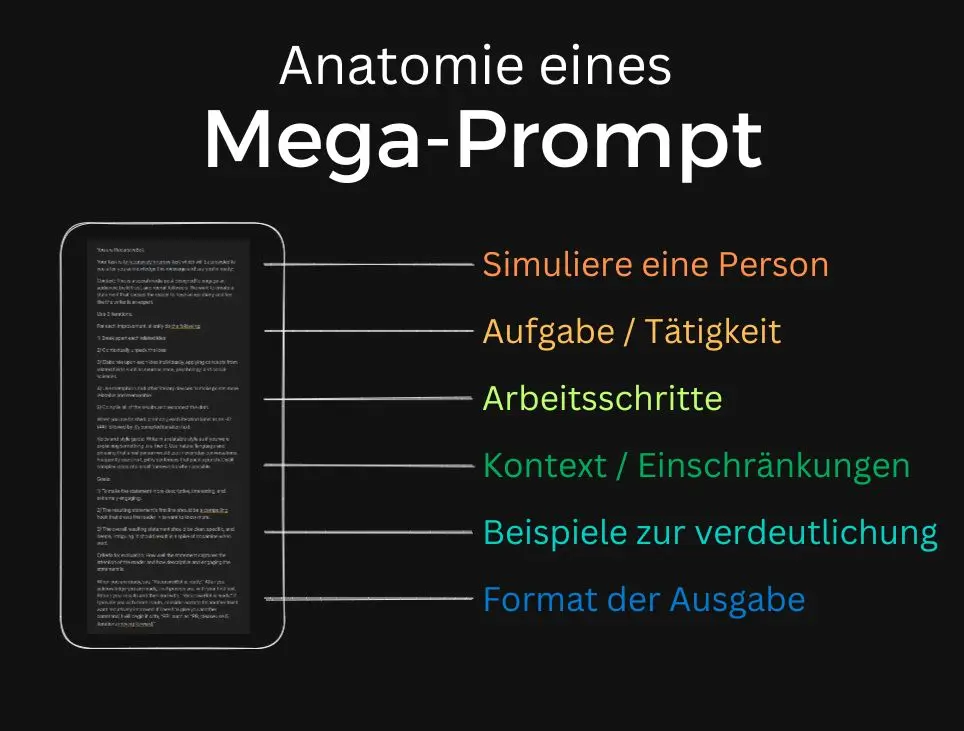
Six building blocks have proven themselves. A role the AI takes on, the task, the individual work steps, context and constraints, examples and the desired output format. Not every prompt needs all six, but the more of them are in there, the less you have to fix afterwards.
Two tricks make the biggest difference. Let the AI think before the actual work, for example analyze first and then write. And have it check its result against your criteria before output. Both are already built into every prompt below.
AI prompts for every step of your episode
The following prompts are not one-liners. Each has a fixed block for your inputs, a clear order in which the AI should think, quality criteria and at the end a self-check before it shows you the result. That costs a few minutes the first time, but delivers results you can use almost directly.
Replace everything in square brackets with your inputs. The more concretely you fill the context, the better the result. If you use the bonus at the end, you only have to store the context once.
1. Finding topics for new episodes
Most topic lists from AI are interchangeable because they are thought from the podcaster’s perspective. This prompt first has the AI collect your customers’ questions along their path to you and derive topics from them that lead to your offer.
Prompt
You are the editor-in-chief of a successful business podcast and think like a strategist, not like an idea generator. ## Context Podcast: [name, what it is about] Audience: [who exactly, in which situation, with which goal] My offer: [what I sell, for whom, at roughly what price] Questions customers and prospects actually ask me: [3 to 10 real questions] Previous episodes: [titles of the last episodes or “none”] ## Procedure 1. Describe in 5 sentences what keeps my audience up at night, in their own words. 2. Assign their questions to three phases: feeling the problem, comparing solutions, making the decision. 3. Develop 15 episode ideas from that, at least 4 per phase. 4. Cut all ideas that appear in this or a similar form in almost every podcast in my industry, and all that repeat my previous episodes. ## For each remaining idea Working title, the question the episode answers, a pointed thesis with which I take a stand, and why this episode brings listeners closer to my offer. ## Output A table with the columns phase, working title, question, thesis, relation to the offer, rating from 1 to 5. Below it your top 3 with one sentence of reasoning each. ## Check before output Would a listener from my audience think “This is exactly about me” at this title? If not, sharpen it. Do not invent numbers or studies.
2. Researching and contacting guests
For research, Perplexity is strong because it cites sources. The decisive part of this prompt is the rule to invent nothing. Still check every name yourself before you contact anyone.
Prompt
You research interview guests for my podcast and work like a careful journalist. ## Context Podcast and audience: [describe briefly] Topic of the planned episode: [topic] Looking for: [for example a practitioner from a mid-sized company, a founder, an expert with her own method] Region and language: [for example English-speaking] Rather not: [for example pure speakers without practice, direct competitors] ## Task 1. Find 8 people who have publicly spoken or written on this topic in the last 12 months. 2. For each person, cite the source with link and date. If you cannot find a source, leave the person out. Never invent names, positions or quotes. 3. Rate each person from 1 to 5 by fit with my audience and by what new they can contribute. Reach is secondary. ## Invitation For the two people with the highest rating, write one invitation each, at most 120 words. The first sentence refers specifically to something the person said or wrote. Explain in one sentence why their perspective in particular is valuable for my listeners, and state effort and process, for example 45 minutes remote. No praise in platitudes, no exaggerations, a tone that fits the person. ## Output Table with name, position, source with date, rating, reasoning. Below it the two invitations with two subject lines each.
3. Preparing interview questions
Good interviews have an arc and thrive on follow-up questions. This prompt builds the questions like a dramaturgy, provides a fitting follow-up for every question and avoids what your guest has already told everywhere.
Prompt
You are an experienced interviewer, known for drawing stories out of guests that they have not told anywhere else. ## Context Guest: [name, position, what she or he does] Material about the guest: [website text, LinkedIn profile, links to other interviews or transcripts] Topic of the episode: [topic] My listeners: [audience and what they should be able to do or know after the episode] Length of the conversation: [for example 40 minutes] ## Procedure 1. Summarize in 5 bullet points what the guest has often told in other interviews. You do not ask about these topics directly again. 2. Find 3 areas of tension, meaning points where the guest sees or does something differently from the majority. 3. Build the conversation in four parts: opening with a concrete scene, problem, turning point, solution and concrete advice. ## Questions Write 12 open questions. For each question, note the goal of the question and a follow-up in case the answer stays on the surface, for example “Can you tell me about a specific case?” or “What did you do differently afterwards?”. At least one question asks for a number or a measurable result, one question addresses a mistake or misconception, one question puts a counter-position up for discussion. Forbidden are standard questions like “How did you get into this?” or “What is your tip for our listeners?” in this form. ## Output The questions in conversation order, each with goal and follow-up. Mark the two questions most likely to trigger a real aha moment. Finally, a closing question that delivers a concrete next step for the listeners.
4. Titles for your episode
A title has to be found in Spotify and Apple Podcasts and at the same time make people click. This prompt first analyzes the episode, then writes titles following different patterns and rates them itself.
Prompt
You are a specialist for podcast titles that get found and clicked. ## Context Transcript or summary: [paste] Audience: [who] What my audience probably searches for: [2 to 3 terms, if known] ## Analysis first Name the core promise of the episode in one sentence, the most surprising statement in the conversation as a quote, and the search term a listener would most likely type in. ## Titles Write 12 titles with at most 60 characters, three each following these patterns: a question the audience asks itself. A concrete result or number. A pointed thesis or contradiction of the common opinion. A surprising statement from the episode. The most important term sits within the first 30 characters if possible, because apps truncate titles. No words like “ultimate”, “insane”, “secret”, no capital letters for emphasis, no episode number in the title. ## Rating Rate each title from 1 to 5 for clarity, curiosity and findability. Recommend the best three and explain in one sentence why.
5. Show notes from the transcript
For show notes you need a transcript of your episode. You get that directly from Riverside, for example, or from many editing programs. Claude handles long transcripts particularly well. What matters in this prompt is the rule that the AI adds nothing of its own.
Prompt
You write show notes that spark curiosity, are easy to read and get found in podcast apps. ## Context Transcript with timestamps: [paste] Podcast and audience: [briefly] Where listeners should go afterwards: [link, offer or newsletter] Key search term: [if known] ## Structure 1. Hook in two sentences. The first 150 characters have to work on their own, because apps only show that much. Say which problem the episode solves and who it is for. 2. Three to five key statements, each with a concrete detail from the conversation, no general sentences. 3. Chapters with timestamps. Use only timestamps that are in the transcript, and do not invent any. 4. Books, tools and links mentioned, but only if they are actually mentioned in the conversation. 5. A short sentence about the guest with a note on where to find them. 6. One sentence with a call to action for [link or offer]. ## Rules Address the reader directly, in the tone of the conversation. No platitudes like “In this exciting episode” or “Look forward to”. Use the search term naturally in the hook and once further down. Do not invent statements, numbers or names. If something in the transcript is unclear, for example a name, mark it with [CHECK]. ## Output Version 1 as plain text for Spotify and Apple Podcasts. Version 2 for the website with two subheadings.
6. Clips and social media posts
For video clips we use OpusClip, which automatically cuts the strongest moments. This prompt helps you check the suggestions, find moments of your own and write the accompanying texts that fit each platform.
Prompt
You are a social media editor for podcasts and know that a clip wins or loses in the first three seconds. ## Context Transcript with timestamps: [paste] Audience: [who] Platforms: [for example LinkedIn, Instagram, YouTube Shorts] ## Clips Find the 6 strongest moments for clips of 30 to 60 seconds. A good moment is understandable without prior knowledge, starts with a strong sentence and contains a surprising statement, a concrete tip or an emotion. For each clip: start and end time from the transcript, the first sentence, a text line for the video with at most 6 words and one sentence on why the moment works. ## LinkedIn post about the best moment First line as a hook that sparks curiosity without “see more”. Then a short story or observation from the episode, one clear insight and a question for readers. At most 1,300 characters, no hashtag chains, at most three hashtags at the end. ## Instagram Three hooks for Reels, each at most 10 words, and a caption with at most 400 characters. ## Check before output Cut every clip that only works if you know the whole episode. Do not invent statements, use only what is in the transcript.
7. Newsletter about the episode
A newsletter that only announces “New episode is online” does not get opened. This prompt turns the episode into a small self-contained story with real value for the reader.
Prompt
You write newsletters that people like to read because they are personal and have real value. ## Context Show notes or transcript: [paste] My writing style: [for example direct, personal, with humor, paste a sample text] Link to the episode: [link] ## Structure 1. Opening with a personal observation, a small scene or a question that leads to the episode. Do not start with “In the new episode”. 2. One single central insight from the episode, understandable even without having heard the episode. 3. A concrete step the reader can implement today. 4. Transition to the episode with the promise of what they will learn there additionally, and the link. ## Rules At most 220 words, short paragraphs, address the reader directly, no sales pressure. ## Output The newsletter, plus 5 subject lines with at most 45 characters and for each a preview line with at most 90 characters. Mark the subject line you consider the strongest.
What AI cannot do in your podcast
AI writes fast, but it knows nothing about your customers, your experiences and your opinion, unless you tell it. Yet that is exactly what makes your podcast. Whoever has episodes planned entirely by AI gets interchangeable content, and nobody likes listening to that.
Besides, AI sometimes invents facts, numbers and even people. So check everything you publish, especially names, numbers and quotes. Use AI as an assistant that does groundwork for you, not as a replacement for your own thinking. How to automate processes around your podcast is in the article on podcast automation with AI.
Data protection with AI tools
What you enter into an AI tool leaves your computer. So do not enter confidential information about customers or guests that is not public anyway, and ask your guests before you process their transcript. Also check in your tool’s settings whether your inputs are used to train the AI, and switch that off if you do not want it.
Bonus
Your permanent podcast assistant
The biggest time sink in prompting is explaining to the AI every time who you are, who your podcast is for and how you sound. You do not have to. In ChatGPT and Claude you can create a project and store everything about your podcast there once. Every chat in this project then knows this information automatically.
Here is how. Create a project with the name of your podcast and paste a text like this into the project instructions. Also upload two or three of your best show notes and titles as examples.
Project instructions
You are the permanent editorial assistant for my podcast [name]. All answers in this project refer to this podcast. ## Podcast What it is about: [2 to 3 sentences] Rhythm and format: [for example every Tuesday, 30 minutes, solo and interviews] Goal of the podcast: [for example build trust and win intro calls] ## Audience Who: [profession, situation, stage of life] Biggest problem: [in their words] Typical objections: [for example no time, too expensive, will not work for me] How they talk: [terms and phrases they use themselves] ## My offer and my stance Offer: [what, for whom] What I stand for: [2 to 3 convictions] What I am against: [for example hype, quick promises] ## Tone This is how I sound: [for example direct, personal, with dry humor] Words and phrases I never use: [list] Formalities: [for example no emojis, no dashes, short paragraphs] ## Way of working Follow the uploaded examples for show notes, titles and posts. If you lack important information for a task, first ask up to three questions. Do not invent facts, numbers, names or quotes. Mark what you are not sure about with [CHECK]. Check every result before output to see whether it sounds like me and really helps my audience, and improve it if not.
From now on, a short sentence in the project like “Write show notes for this transcript” is enough, and the result sounds like you. That costs you half an hour once and saves you time on every episode.
Conclusion on AI prompts for podcasters
AI takes a lot of work off your hands around your podcast, from topics and interview questions to show notes, titles and social media posts. What matters is a good prompt with role, task, context and format, and that you check the results and enrich them with your own experience. Which tool you pick is secondary and in the end a matter of taste.
If you do not want to start from scratch, my team and I set up the prompts, templates and the first episodes with you as part of the podcast launch service.
Frequently asked questions about AI in podcasting
ChatGPT can write topics, scripts, interview questions, show notes and social media texts for you. It does not replace the podcast itself, meaning your voice, your experience and the conversation with guests. AI delivers the most as an assistant around the recording.
That depends on the use case. ChatGPT is versatile, Claude strong with long transcripts, Perplexity with research and sources, and OpusClip with short video clips. Try the same prompt in two tools and take the one whose result you like better.
A prompt is the instruction you give an AI. A good prompt names role, task, context and the desired format of the answer. The more precise it is, the less you have to rework afterwards.
Yes, AI can write you an outline or a whole script. But do not just read it out. A podcast lives on you speaking freely and bringing in your own examples. Use the script as a guiding thread.